Turn your Android into a Smart TV remote and media caster
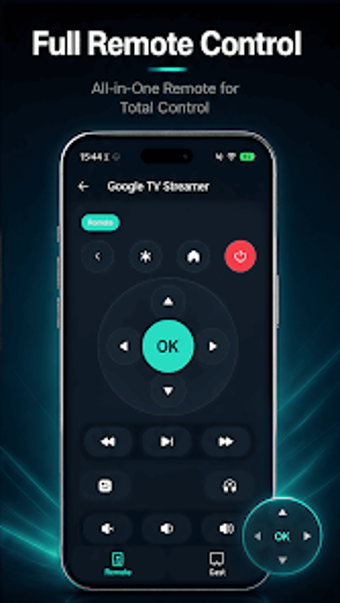
Turn your phone into a TV controller with Universal Remote - All in One, from MiGusta, designed to manage Smart TVs and cast media over local networks. The app provides a full remote interface, gallery casting for video, photo and audio, control playback and volume, and automatic discovery with one-click connection to nearby TVs. It mimics traditional remotes’ layout and targets Android owners who want to replace lost physical remotes or cast phone media without extra hardware.
What the app does and how it connects to a television
The app converts an Android device into a remote and a media sender, using network-based discovery to pair with TVs on the local Wi-Fi. Key capabilities include a full remote interface and a Cast From Gallery mode for photos, videos and audio. Practical items are presented in one place so users can access power, navigation, playback and volume without juggling multiple physical remotes.
Does it need extra hardware like an IR blaster?
The app controls Smart TVs over the network rather than using infrared, so it does not depend on an IR blaster. Because pairing uses automatic discovery and a one-tap connection, the setup avoids IR pairing steps and removes the need to keep multiple physical controllers. This design makes the tool suitable for newer, network-capable televisions rather than legacy sets that accept only infrared signals.
How the app behaves on a home network and what that implies
Connections occur on the local Wi-Fi, using automatic device discovery to locate nearby TVs on the same subnet. That local operation simplifies setup and keeps traffic inside the home network when both devices are connected. The app’s discovery and casting workflow reduces manual address entry, which benefits users who prefer a quick, in-network pairing process rather than entering IPs or using external bridging services.
Do non-technical users need special skills to operate it?
The interface mimics a traditional physical remote and offers one-click connections, lowering the bar for non-technical users who need a replacement controller. In addition, the combined remote and casting functions place playback controls and media selection in a single workflow. The app is therefore practical for Android owners who want straightforward TV control and media streaming without deep networking knowledge.
Practical recommendation with a single clear trade-off
The app is a practical choice for Android owners who need a single tool to control and cast to Smart TVs, consolidating remote and media functions into one interface. The main trade-off is network dependence: both smartphone and television must share the same local Wi-Fi for discovery and casting, which limits use outside the home network. For local, in-home control it reduces reliance on multiple physical remotes and performs reliably.